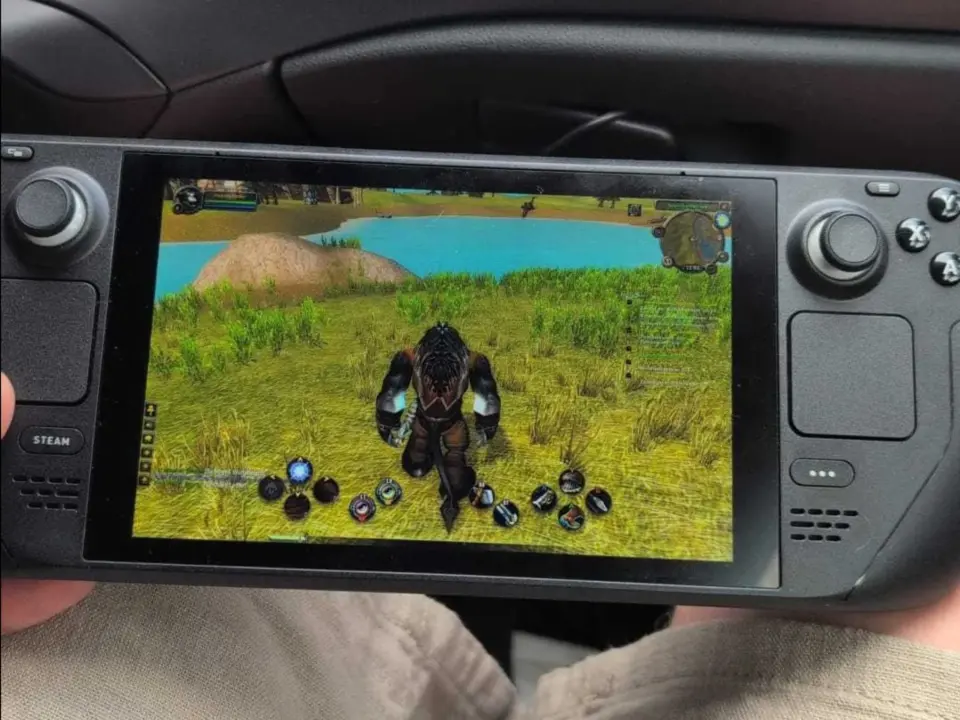
World of Warcraft Forever is now playable on the Steam Deck. Mobile gamers can now experience the old school MMO without the need for a desktop PC. This is a big one to have on the portable gaming front.
Portable MMO questing is now possible with Proton Experimental and Battle.net
Usually these are high resource games. You can now quest on the go. If you can get the layers right.
- Steam Deck Performance: Runs 'amazingly well' with default settings and 30 FPS cap; 60 FPS achievable at graphics preset 5
- Installation Method: Windows Battle.net installer via Proton Experimental on Steam Deck Desktop Mode
- Controller Support: Native Gamepad options available; ConsolePort add-on recommended for full controller adaptation
World of Warcraft Forever is a reboot of the original game from Blizzard Entertainment. In order to get it working on Valve's handheld, you will need to install the Windows version of Battle.net client. On the Steam Deck, we are using Proton Experimental to run the Battle.net client installer in the Desktop Mode. This helps with the translation from Windows software to the SteamOS (Linux).
Word on the street is that it is running quite well on the device. A beta gamer reported that it was fine playing at default with 30 FPS cap. If you want to get more FPS, you can set the graphic preset to 5 to get 60 FPS. You can tune to get a balance of visuals and battery use if you like.
Controller functionality will need some tweaks to get it working as well as it could. You'll need to turn on the Gamepad setting from the in-game settings menu. If you want a more complete remapping for the handheld layout, consider installing the add-on ConsolePort.
There have been reports from some players that they have minor problems triggering certain quest items. However, nothing to disrupt the game loops.
Some of the balance and stability topics that we covered in the last World of Warcraft Forever update were present in the discussion in the community. Judging by the performance reports we've seen lately, there are stability improvements over to the handheld gaming world as well. Get on your Steam Deck and play it! Just remember to get those layers configured.
Source: NotebookCheck
Discussion
0 comments