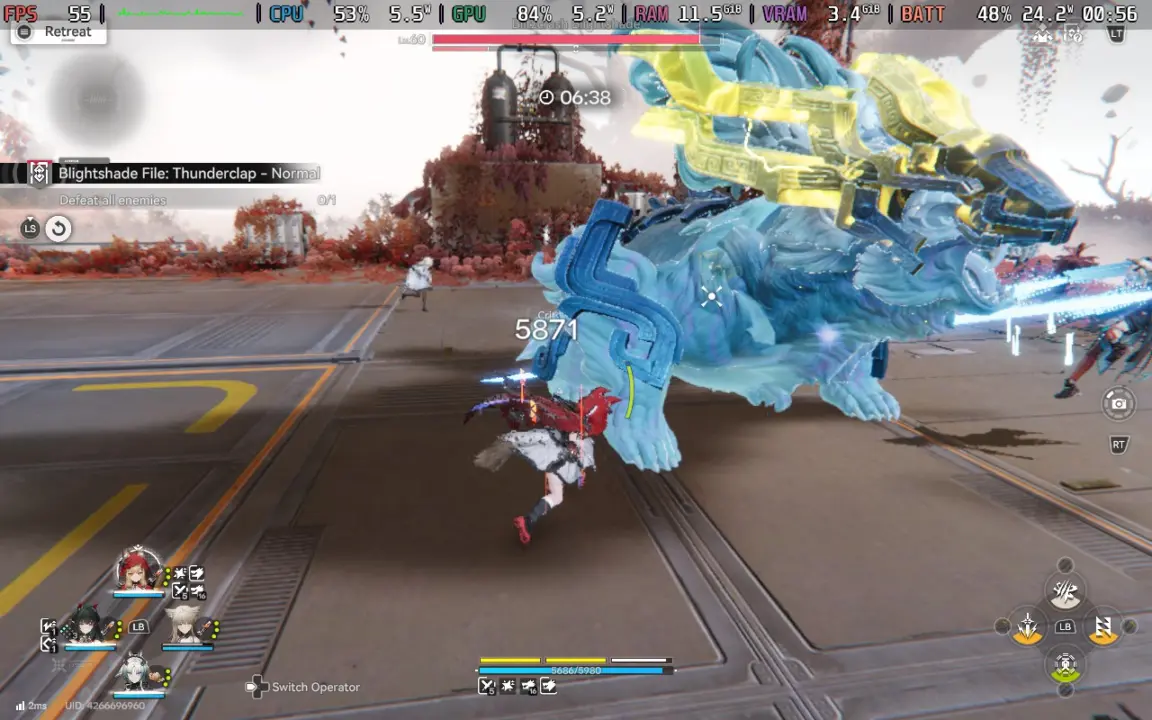
Arknights: Endfield hit Steam 2 days ago. Early performance stats show that the gacha game works okay on Valve’s handheld. Arknights: Endfield has a stable FPS at default settings which is very important for users who want to play their game collection without searching for optimization patches.
Hypergryph gacha title delivers stable frame rates on Valve handheld
For people who care more about stable performance than the visuals. You can get playable performance right out of the box.
- Steam Deck Performance (Default): 40-50 FPS
- Steam Deck Performance (Combat/Open Areas): Stable at 40 FPS lock, minor stutters
- API Comparison: DX11 runs 3-4 FPS better than DX12
The game is developed by Hypergryph. It’s an anime fighting game with factory management elements. The game was released on PC (Steam).
With that means all the unique engine requirements it has. They will be applied to the Steam Deck. Obviously you will see the same high CPU utilization patterns as you see in other gacha genre games.
Arknights: Endfield has 40-50 FPS performance at default settings on Steam Deck. The game is able to have a stable FPS with a 40 FPS cap during combat and open areas. There’s only a bit of stuttering.
DX11 gives you 3-4 FPS more compared to DX12. So if you like using DX11. You will have an edge in this regard.
While playing the game, there’s still a lot of battery drain. But you will not face any severe thermal throttling or FPS drops. The fact that the game is able to achieve 40 FPS stable.
Shows that the game engine is handling the constraints of the Steam Deck relatively well. You can see similar balance and stability themes when we covered the last Arknights: Endfield update.
So to sum it up. You can play Arknights: Endfield on your Steam Deck. Current default settings are playable.
You will get 40-50 FPS on general scenes. Also, you’ll have a 40 FPS cap during action. A little bit more performance if you use DX11 compared to DX12 if you want.
Source: Arknights, SteamDeckHQ



Discussion
0 comments