Microsoft is overhauling the Windows 11 search interface to prioritize local system queries over web results. This change matters because it reduces the frustration of irrelevant web ads appearing when you simply want to open a local app or setting. The update removes all Microsoft service advertisements from the search box, freeing up screen space for more useful information.
Microsoft removes ads and prioritizes local results in latest Insider preview
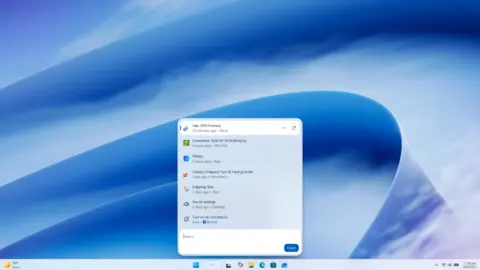
The revised search experience arrives in the latest Windows Insider preview release for the experimental update channel. Notebookcheck describes this as the most extensive update to the taskbar search box to date. The interface now displays a two-column layout that organizes previous search queries and system results more clearly.
Local search results now take priority in the new version. If you search for a system setting or a local app with a typo, Windows 11 no longer falls back to a web search as often. The update also introduces large preview support for compatible file types directly within the search results. This allows users to view file content without opening the associated application.
Web search results now appear at the top of the list without requiring users to scroll first. The interface highlights results more clearly to distinguish between apps, files, settings, and websites. Microsoft has not yet specified when the improved search box will be rolled out to all Windows 11 users as part of a stable update. The feature is currently being rolled out gradually to beta testers in the experimental update channel.
We looked at the last Windows 11 update earlier while tracking Microsoft's balance and stability themes. This search overhaul represents a shift toward a more utilitarian interface that favors local functionality. The change removes a common point of contention for users who prefer a cleaner desktop experience.
Source: NotebookCheck