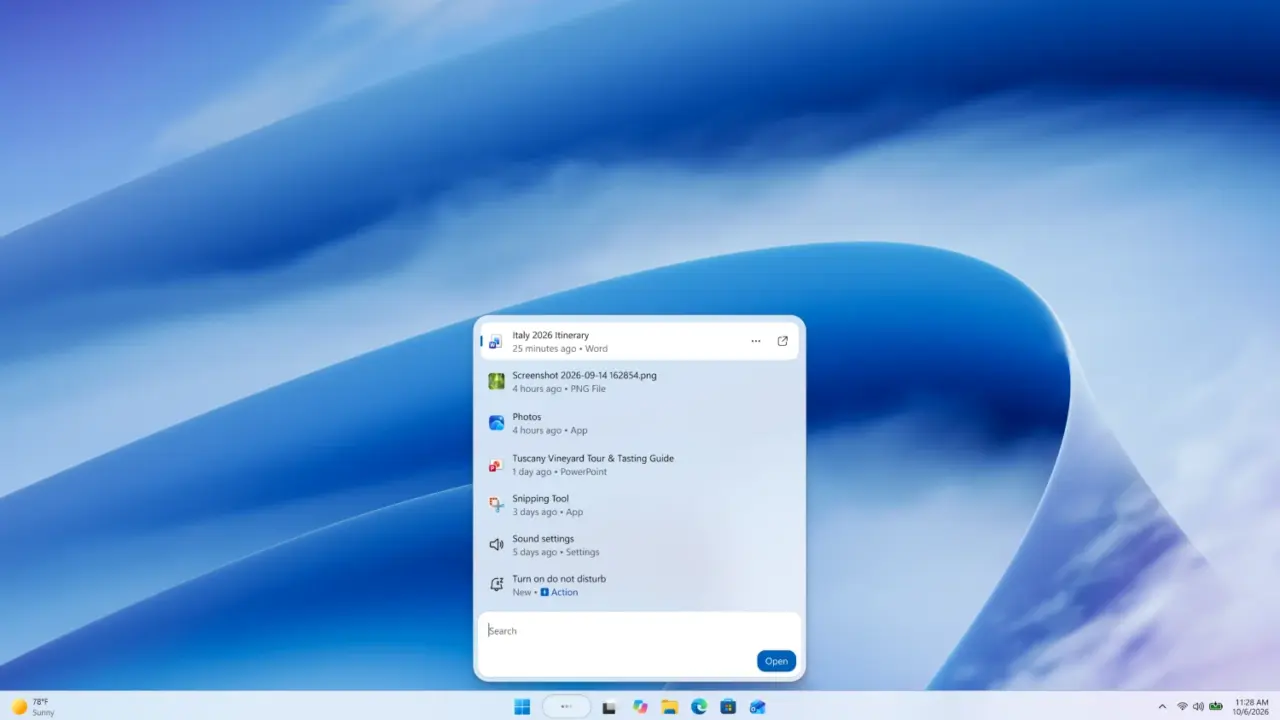
Microsoft is overhauling the Windows 11 search experience to cut through the visual noise that has cluttered the interface in recent builds. This redesign targets users who need quick access to system controls without wading through ads or redundant suggestions. The change matters because it restores a cleaner, more functional workflow for daily tasks.
Redesigned search bar shifts to taskbar bottom and removes right pane
The updated search bar now sits at the bottom of the screen instead of the top, a shift that aligns with standard taskbar placement. Microsoft removed the right-hand pane entirely to eliminate the distractions that previously occupied that space. The interface relies on the WinUI 3 codebase to deliver a more responsive and modern look.
Users can now type specific commands directly into the search box to trigger system actions without opening separate settings menus. Commands like 'turn on Bluetooth', 'mute', or 'show desktop' execute immediately upon entry. This inline functionality reduces the number of clicks required to adjust common preferences.
Microsoft reports that memory usage and performance have improved substantially during early testing of this update. The changes are currently available in Windows 11 Insider Preview builds 26340.9616 and 28120.3181. Future iterations may add phone actions, such as sending text messages, directly from the search interface.
This update follows the last Windows 11 update, where we noted several balance and stability themes that are now being addressed through interface simplification. The current release focuses on removing visual clutter and improving command accessibility. The redesign aims to make the search box a more practical tool for power users.
Source: Microsoft, TweakTown

Discussion
0 comments