GAMES Turn 10 Studios fully merges into Playground Games, Forza Motorsport creator Dan Greenawalt retires GEFORCE RTX RTX 5080 prices hit $1,980 as Nvidia removes card from official store GAMES Dune: Awakening gets 35 hours of free ‘Blood and Ice’ expansion on December 1 GAMES Star Wars Jedi 3 enters advanced development stage, official announcement expected soon CONSOLES Xbox US market share shrinks as Asha Sharma’s strategic initiatives fail to reverse sales decline AYANEO Ayaneo KONKR Pocket Advance gets translucent ‘Ice Pink’ shell for around $129 PHONES OnePlus pauses compact phone updates, leaving small-screen fans waiting indefinitely GAMES The Lord of the Rings Online expansion The Wolves of Mordor launches with new region and pricing AYANEO Ayaneo releases AYASpace 2 Pocket Museum launcher with cross-device save syncing and rewind CONSOLES Fake PS5 emulators on GitHub steal passwords and disable Microsoft Defender NINTENDO Eden-NX2 Emulator Brings Early Nintendo Switch 2 Support to PC PC HARDWARE Sam Altman claims PCs waste 95% of DRAM supply, advocates for cloud-only AI AMD Acer Swift Air 14 launches in Japan with Ryzen AI 7 345 for around $1,348 GAMES Anthem petition gathers nearly 5,000 signatures in three days as fans demand server relaunch

Microsoft Copilot Sidebar Docking Mode Pushes Windows 11 Apps Aside

NicoGG 1 min read

Microsoft expands Copilot on Windows 11 with a new sidebar docking mode that resizes and repositions open apps. Learn about this limited rollout update.

Microsoft Copilot Sidebar Docking Mode Pushes Windows 11 Apps Aside
SOFTWARE AND UPDATES

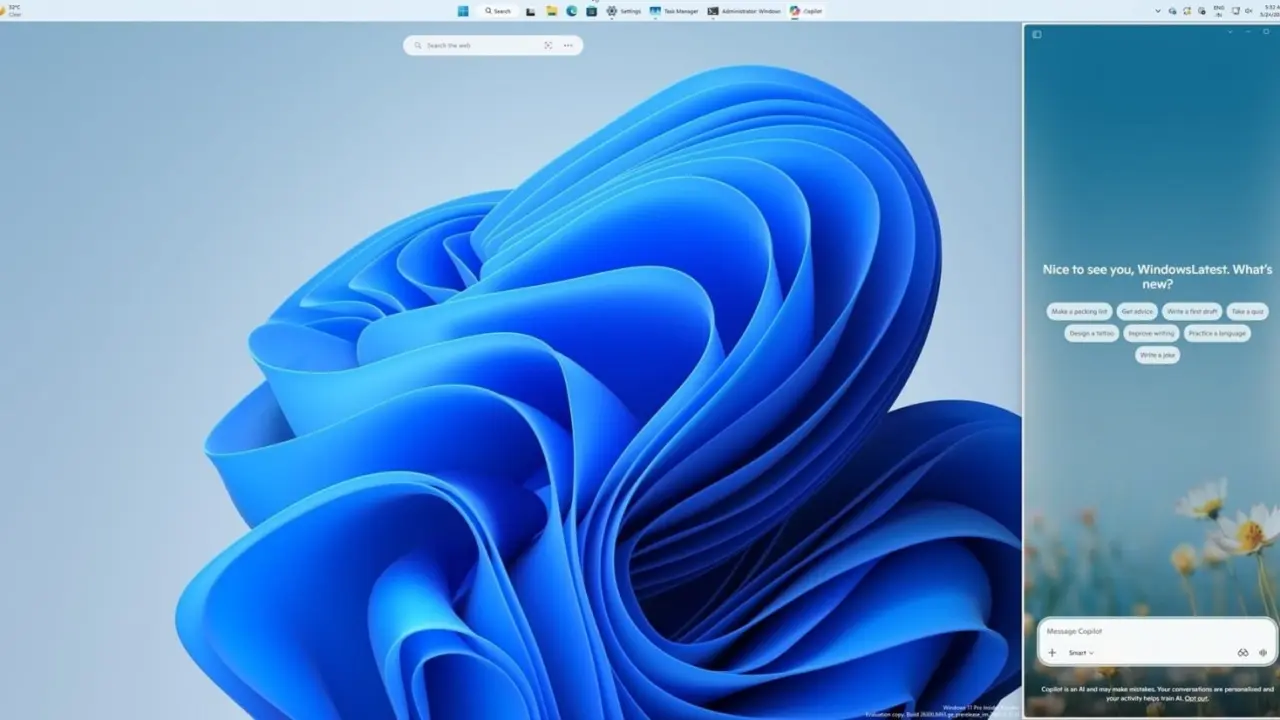
Microsoft is expanding the presence of Copilot on Windows 11 with a new sidebar docking mode that physically pushes open applications aside to make room for the AI assistant.
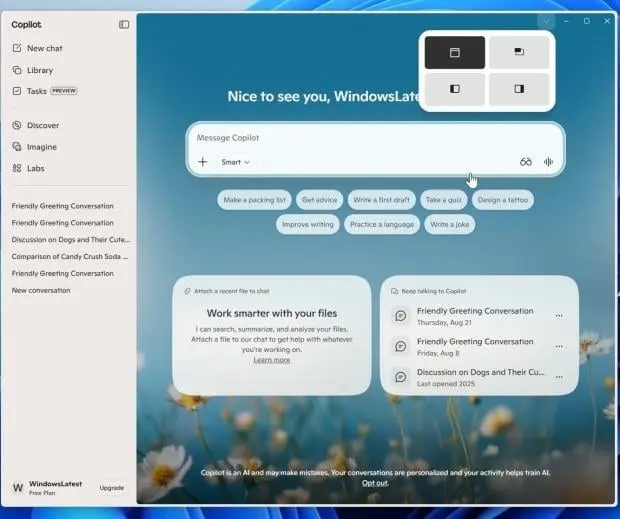
Microsoft Copilot sidebar docking mode on Windows 11

New sidebar docking mode physically pushes open applications aside to make room for the AI assistant

The update introduces a dropdown menu in the title bar, allowing users to dock Copilot on either the left or right edge of their screen. Users can also switch between picture-in-picture mode and keep it as a standalone app depending on their workflow preferences.

This docking feature represents a reversal of previous efforts under Project K2, which aimed to scale back Copilot's footprint and remove it from apps like Notepad. This update reflects a strategic pivot by Microsoft to more deeply integrate AI capabilities within the Windows 11 interface.
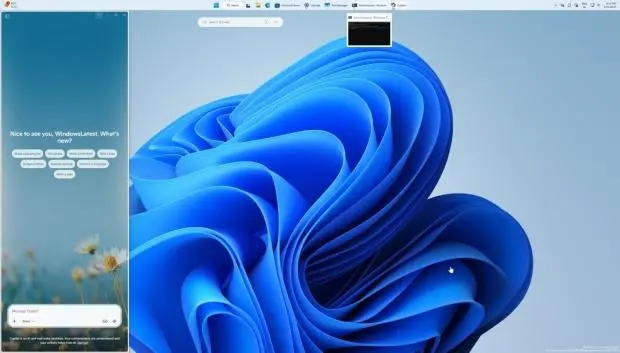
Windows 11 interface showing Copilot sidebar

The new sidebar is currently available through a limited rollout. Microsoft has not confirmed a specific date for a broader release, leaving many users waiting to access the updated functionality on their devices.

Source: TweakTown