AMD's latest graphics driver update has introduced a critical launch failure for Windows 10 users, disrupting access to new gaming features. This issue matters because the problematic version, Adrenalin 26.6.2, blocks the driver from starting on the affected operating system. Users relying on Windows 10 for their daily computing or gaming tasks cannot proceed with the update until AMD resolves the incompatibility.
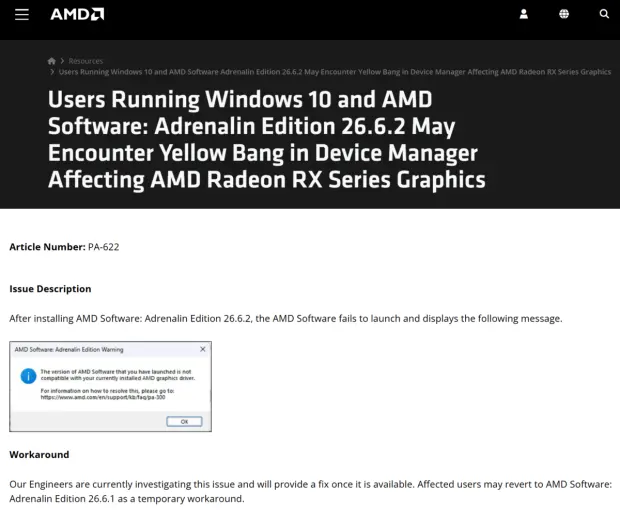
Users must revert to version 26.6.1 to restore graphics functionality
The software in question is the AMD Adrenalin driver, which manages performance and settings for Radeon graphics hardware. The specific version causing issues is 26.6.2, which also targets Radeon RX 7000 series cards, RX 9000 series cards, and Ryzen 9000 integrated graphics. While the update aims to enhance capabilities for these devices, the launch failure prevents any user on Windows 10 from accessing these improvements.
- Affected Driver Version: Adrenalin 26.6.2
- Affected OS: Windows 10
- Error Symptoms: Incompatibility error, Device Manager yellow exclamation mark, Error Code 43
- Workaround Version: Adrenalin 26.6.1
- New Features in Broken Version: FSR 4.1 support for Radeon RX 7000 series, Assassin's Creed Black Flag Resynced, DOOM: The Dark Ages Revelations
Users encountering the bug report specific error symptoms that confirm the driver cannot initialize. The system displays an incompatibility error message, and the Device Manager shows a yellow exclamation mark next to the graphics adapter. Additionally, the hardware reports Error Code 43, which typically indicates a device failure or driver conflict. These signs are consistent across reports from affected Windows 10 machines.
AMD has identified that the problem is isolated to Windows 10, with Windows 11 users experiencing no such issues. The company recommends that affected users roll back to the previous version, Adrenalin 26.6.1, to restore functionality. This workaround allows the driver to launch and operate normally, though it removes the new features introduced in 26.6.2. The rollback process effectively reverts the system to a stable state while the underlying bug remains unresolved.
The 26.6.2 driver was designed to bring FSR 4.1 support to Radeon RX 7000 series graphics cards. It also added game-ready support for Assassin's Creed Black Flag Resynced and DOOM: The Dark Ages Revelations. Rolling back to 26.6.1 means users lose access to these specific features until AMD provides a fix. The company has not confirmed whether the solution will arrive as a new driver release or a patch to the existing version. No timeline has been provided for the resolution of this issue.
Source: TweakTown