
Microsoft is quietly updating a legacy interface element in Windows 11 that many users still encounter daily. The company is replacing the classic File Explorer Properties window with a modern version built on the WinUI framework. This change matters because it shifts a core system tool to a new design language that supports better performance and lower memory usage. Users will eventually see a more consistent look across the operating system as Microsoft migrates older components.
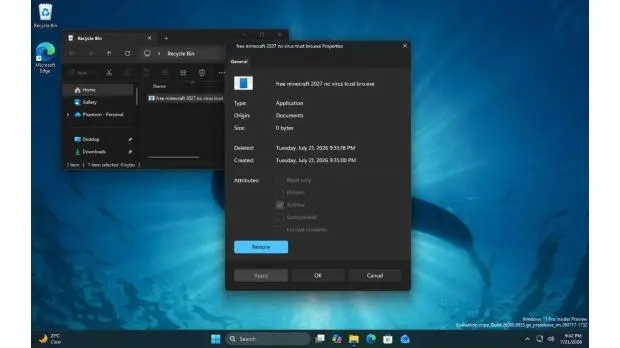
Microsoft shifts legacy interface to WinUI 3 for better performance
The update targets the Properties window that appears when you right-click a file or folder in File Explorer. We spotted the new interface in the experimental Windows 11 build 26300.8935. The new design uses the WinUI framework instead of the older legacy code. This aligns with the Windows K2 initiative to modernize the operating system's visual elements.
The redesigned window includes support for Dark Mode, matching the rest of the modern Windows interface. Microsoft states that the new UI is optimized for performance and a lower memory footprint. The update aims to reduce the resource overhead associated with the previous version of the window. The updated interface is designed to maintain system responsiveness during frequent file detail checks.
The feature is currently hidden from standard File Explorer usage in this experimental build. Users can only access the new Properties window by opening the Properties of files deleted and sent to the Recycle Bin. The feature is currently available only in the experimental build 26300.8935 and is not yet accessible in the standard File Explorer. This update is part of the Windows K2 initiative to migrate legacy elements to WinUI 3.
We looked at the last Windows 11 update while tracking these changes, and several of the same balance and stability themes came up. Microsoft is replacing the classic File Explorer Properties window with a new WinUI-based version. The new Properties window is currently hidden and only accessible via the Recycle Bin in the experimental build.
Microsoft is modernizing the legacy File Explorer Properties window in Windows 11. The new WinUI-based version is currently hidden in experimental build 26300.8935. The feature supports Dark Mode and aims for better performance and lower memory usage. Users can currently only access it via the Recycle Bin in the test build.
Source: TweakTown