Replacing a laptop's internal air cooling with a desktop-grade liquid system can drastically lower operating temperatures and boost performance. This modification matters because thermal throttling often limits the sustained speed of mobile processors and graphics cards during heavy workloads. A recent project demonstrates how extreme thermal management changes can unlock hardware potential that standard cooling solutions suppress.
TrashBench attaches 360mm radiator to laptop lid for massive thermal drop
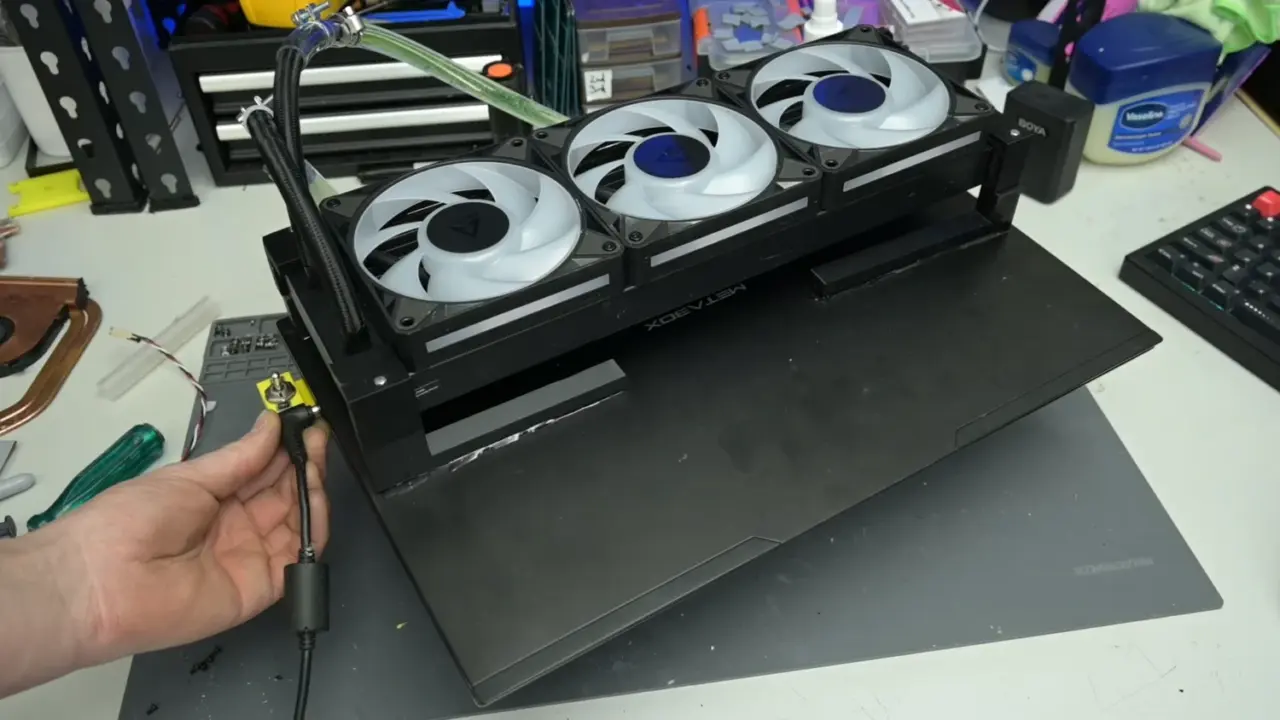
The modder known as TrashBench applied a 360mm all-in-one liquid cooler to a laptop equipped with an NVIDIA GTX 1060 GPU and a Core i7-8750H CPU. He attached the radiator to the exterior of the laptop lid using 3D-printed mounts and spacers. The process involved removing the original internal cooling components and installing custom waterblocks to route heat away from the chips.
Modification Results
- Cooling Modification: 360mm AIO liquid cooler glued to laptop lid with 3D-printed mounts and spacers
- Temperature Reduction: Up to 64C drop (from 95C to 31C under load)
- Performance Gain: Up to 14% higher frame rates in games
- CPU Benchmark Improvement: 14% improvement in Cinebench scores
- GPU Overclock: 101MHz improvement
The thermal results of this modification were significant, with temperatures dropping by up to 64C. Under load, the system temperature fell from 95C to just 31C. This massive reduction in heat allowed the CPU to consume nearly 10 watts less power while maintaining stability. The improved thermal headroom enabled a 101MHz overclock on the GTX 1060 laptop GPU.
Performance gains followed the thermal improvements directly. Games saw frame rates increase by up to 14% after the cooling upgrade and overclocking. Cinebench scores for the Core i7-8750H also improved by 14% due to the cooler operating temperatures alone. These results show that thermal constraints were previously capping both graphical and computational performance.
This specific modification targets the NVIDIA GTX 1060 laptop GPU and Intel Core i7-8750H configuration. The project highlights the physical trade-offs of external cooling, such as the need for custom mounts and lid attachment. It confirms that significant performance unlocks are possible when thermal limits are removed through hardware modification.
Source: TweakTown