Xiaomi is overhauling its mobile gaming experience by replacing the legacy Game Turbo feature with a new hub called Game Space on HyperOS. This change matters because it shifts how players organize and optimize their games, moving away from a single generic mode to a more tailored approach. Users who rely on specific performance settings for different genres will now have more granular control over their device's behavior.
New hub replaces legacy feature with automatic organization and genre-specific settings
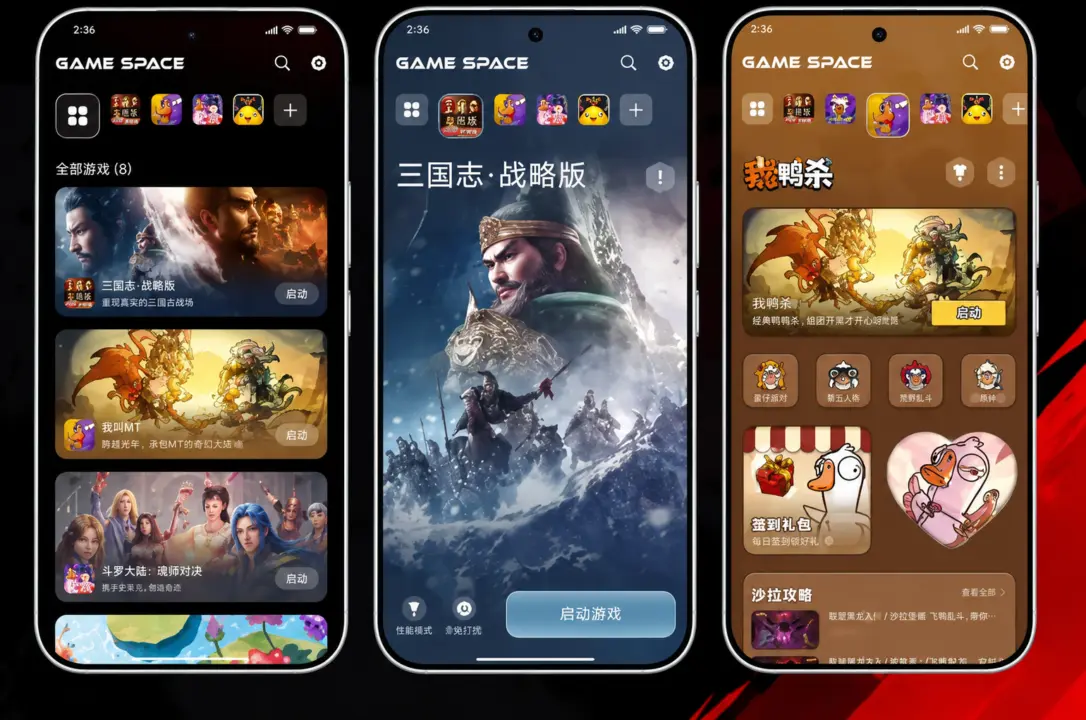
The new Game Space hub integrates directly into the HyperOS software environment. It automatically organizes your library by placing newly installed games into the hub without requiring manual setup. The system also prioritizes frequently played titles, making it faster to access your most used applications. This automation reduces the friction of finding and launching games on your device.
- Feature Replacement: Game Turbo replaced by Game Space
- OS Platform: HyperOS
- Game Organization: Automatic placement of newly installed games; prioritization of frequently played titles
- Performance Profiles: Game-specific profiles (e.g., high-performance + Do Not Disturb for MOBAs; graphics priority + thermal management for open-world)
- Customization: Wallpapers, startup animations, widgets, character backgrounds
Game Space introduces game-specific performance profiles instead of relying on a single gaming mode. Multiplayer online battle arena games can be configured with high-performance settings alongside Do Not Disturb mode to prevent interruptions. Open-world games can be assigned profiles that prioritize graphics quality while balancing thermal management. These distinct settings allow the operating system to allocate resources more effectively based on the game's demands.
The update also adds new personalization options for the gaming interface. Users can customize wallpapers, startup animations, and widgets to match their preferences. You can even set your favorite game characters as backgrounds for the hub. These visual tweaks allow for a more immersive and personalized gaming environment on HyperOS devices.
Source: GIZMOCHINA