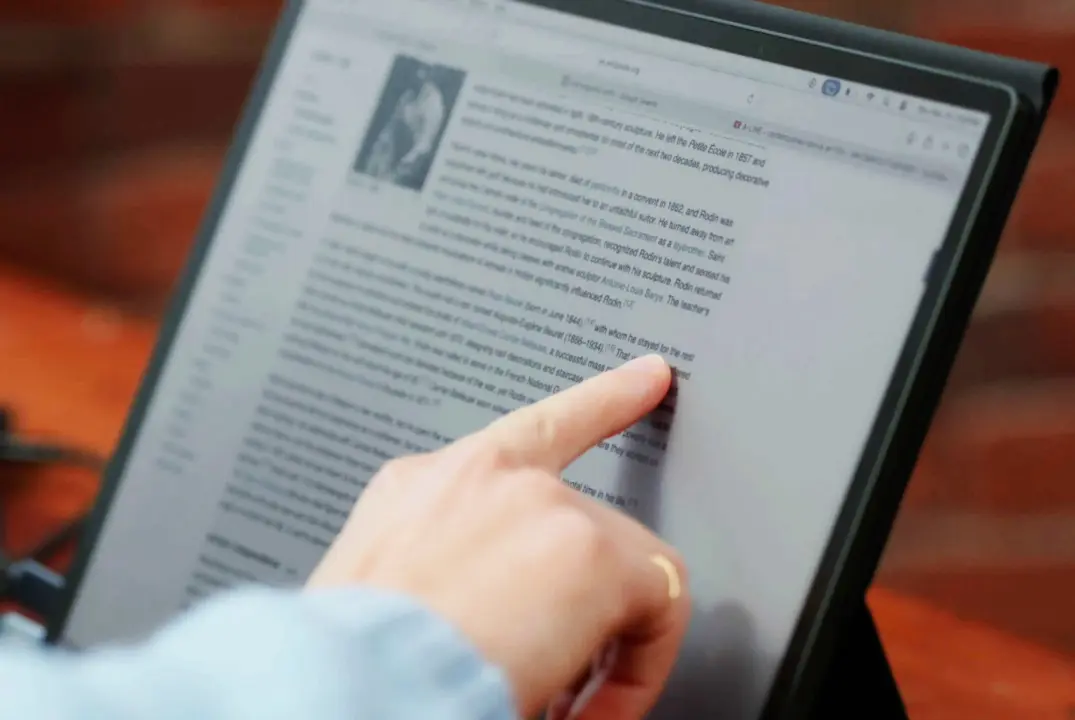
Modos has launched the Flow, a portable E-Ink monitor designed for users who need a second screen that remains readable in direct sunlight. This device targets professionals who work outdoors or in bright environments where traditional backlit displays struggle with glare and eye strain. Buyers looking for a low-power, high-clarity extension for their laptop will find this specific niche addressed by the new hardware.
Portable E-Ink display targets outdoor professionals with high-resolution panels
The monitor connects to a laptop via a single USB-C cable and offers two distinct panel options to suit different needs. The base model utilizes a black-and-white E Ink Carta 1300 display, while the premium version switches to a Kaleido 3 color panel. Both versions maintain a sharp 3,200 by 2,400 pixel resolution and a pixel density of 300 PPI for crisp text and images.
Specifications
- Display: E Ink Carta 1300 or Kaleido 3
- Resolution: 3,200 x 2,400 pixels
- Pixel Density: 300 PPI
- Refresh Rate: 60 Hz (external power)
- Connectivity: USB-C
Modos advertises a refresh rate of 60 Hz when the monitor uses external power, though it drops to a maximum of 40 Hz when running on a single cable. The system achieves a latency of less than 100 milliseconds for input response. Touch input is available on all models, but stylus support is exclusive to the more expensive color display version.
The hardware is not designed for gaming or comfortable video playback because the pixel response time is generally insufficient for those tasks. Modos states that the E-Ink panel is much more comfortable to read in bright daylight compared to standard backlit displays. This limitation ensures users manage their expectations regarding motion and video content on the screen.
The black-and-white model is priced at $699 USD (around $699), and the color version costs $799 USD (around $799). Orders are expected to ship in mid-December through the Crowd Supply platform. This pricing positions the Flow as a specialized tool for specific professional workflows rather than a general-purpose secondary display.
Source: NotebookCheck