
Apple updated its parental control framework in iOS 27 to give parents more granular authority over device usage. The change matters because the new system does not activate automatically when you install the update. You must complete a separate setup step for each child to enable any restrictions. This manual requirement ensures that parents actively configure safety limits rather than relying on default assumptions.
Apple requires separate configuration steps for each child account
The overhaul affects iOS 27 and its sibling platforms including iPadOS 27, macOS 27, watchOS 27, and visionOS 27. Apple redesigned the time management interface to replace the previous Downtime feature. The new Time Allowances system organizes usage limits around three specific categories: Entertainment, Games, and Social Media. This structure allows parents to set distinct boundaries for different types of app usage.
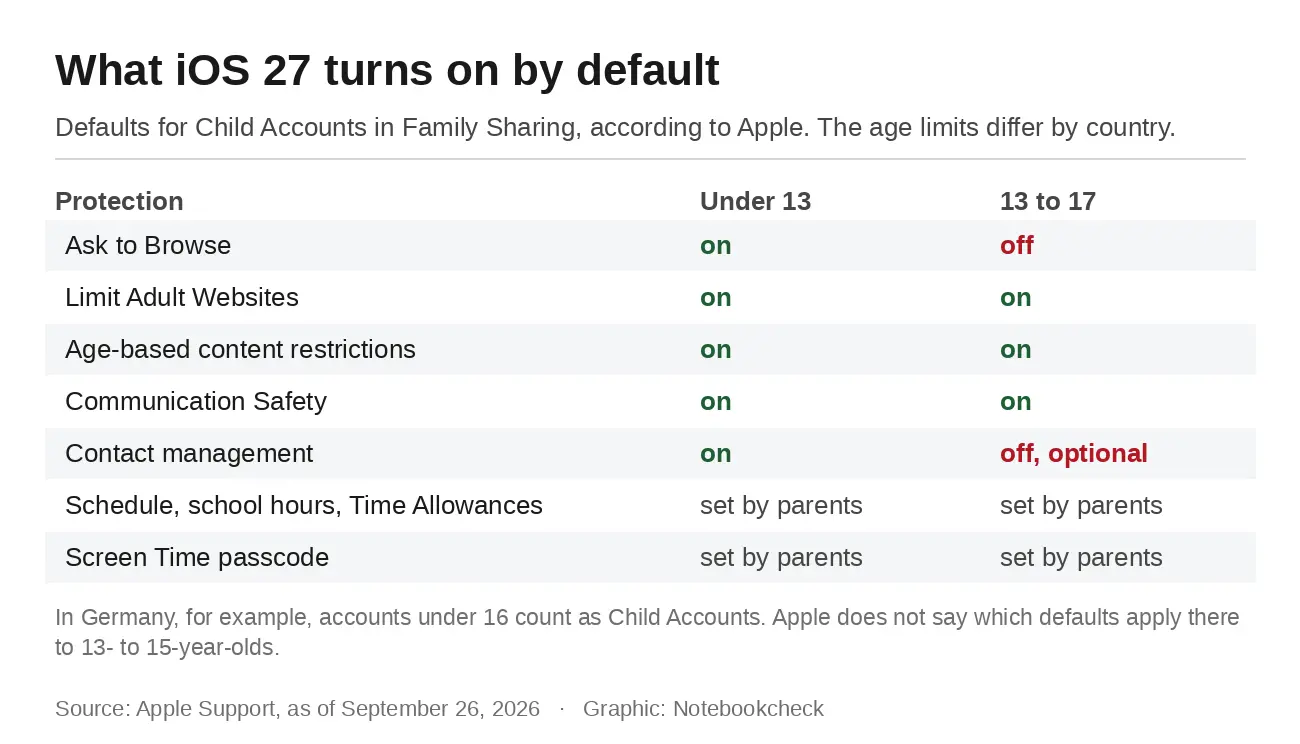
- Ask to Browse: On by default for children under 13; requires manual setup for ages 13+
- Limit Adult Websites: On by default for children under 18
- Communication Safety: On by default for everyone under 18
- Contact Management: On by default for children up to 13; off for older children
- Time Allowances: Replaces Downtime; built around Entertainment, Games, and Social Media categories
Default settings now vary strictly by age groups to align with regional legal definitions. Ask to Browse and Contact Management are enabled by default only for children under 13. Limit Adult Websites and Communication Safety turn on automatically for all users under 18. These defaults provide a baseline of protection that scales as children grow older.
Parents must secure these changes with a mandatory four-digit Screen Time passcode. This code is the final step in the setup process and prevents children from altering restrictions. The system requires this passcode for every parental control modification. We noted similar stability themes in the last iOS 27 update, but this release focuses entirely on configuration workflows.
Apple released iOS 27 on September 14 with these parental control updates. The features require manual activation and specific age-based defaults. Parents need to review the setup process to ensure their children's accounts are properly restricted.
Source: NotebookCheck



Discussion
0 comments