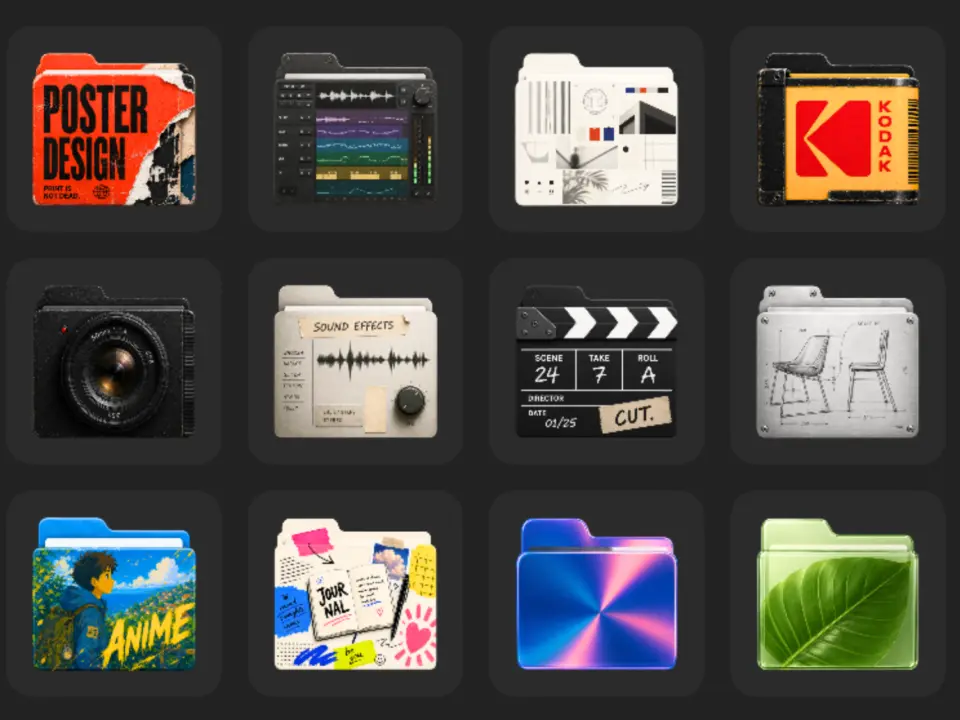
Mac users who find their desktop folders visually monotonous have a new tool to break up the gray monotony. Flairy, a free application from developer Sadek Elfezzani, replaces standard folder icons with colorful, themed alternatives. The app provides a straightforward method for customizing the desktop appearance without requiring system file modifications or terminal commands.
Free tool replaces standard gray folders with themed alternatives
The app is available on the Apple App Store and targets users running macOS 26.0 or later. This requirement effectively excludes anyone still on macOS Sequoia or older versions, as the software relies on newer system capabilities. The download package is compact at 90.3 MB, making it a lightweight addition to your applications folder.
Flairy ships with more than 50 distinct icons organized into specific categories. These themes include design, video editing, artificial intelligence, finance, data, and gaming. The developer states that he built the tool because he was tired of every Mac folder looking the same. The app does not require user accounts, display advertisements, or collect personal data.
There is one notable limitation to keep in mind before installing the software. Flairy cannot apply its custom icons to folders that already have an emoji assigned via the Finder. This means users who rely heavily on emoji tagging for organization will see limited results. We looked at similar customization tools earlier while tracking macOS utility releases.
The application is free with no in-app purchases listed in the store. It is available globally for users who meet the macOS 26.0 requirement. This provides a straightforward, no-cost option for Mac owners looking to refresh their desktop appearance.
Source: Flairy, NotebookCheck