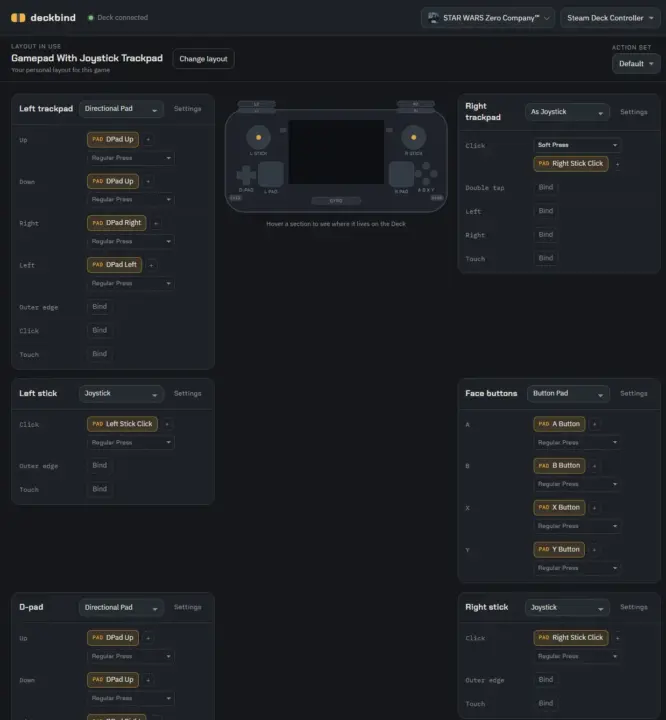
Steam Deck owners who struggle with complex controller schemes can now adjust bindings on the fly without restarting games. Lapin released Deckbind, a new software tool that lets users modify controller layouts in real time through a web interface. This change matters because it removes the friction of mapping controls, allowing players to test and switch configurations while playing.
Lapin releases free tool for live binding adjustments via web interface
The tool operates within the Steam Deck's Game Mode, automatically launching when the device enters that state. It requires a second computer running Node.js to host the web interface that controls the Deck. On the Steam Deck itself, users must install Decky Loader and enable CEF Debugging in the developer tab to connect to the host.
- Platform: Steam Deck (Game Mode)
- Host Requirements: Second computer with Node.js installed
- Steam Deck Requirements: Decky Loader installed, CEF Debugging enabled
- Functionality: Real-time controller layout modification via web page
Deckbind functions by sending real-time updates from the web page to the Steam Deck controller driver. This setup allows for immediate feedback when changing button mappings or axis assignments. The process relies on the connection between the host PC and the Deck's web engine to push layout changes instantly.
The project was developed with assistance from AI, specifically using Claude to help generate the underlying code. Lapin made the tool available for testing on GitHub, allowing the community to try it out before any formal release. Users can download the ZIP file and install the necessary Node.js version to begin testing the functionality.
Deckbind provides a practical way to refine controller inputs for specific games without system-wide changes. The tool is currently available for community testing on GitHub. Steam Deck users with the required setup can start modifying their layouts today.
Source: SteamDeckHQ


Discussion
0 comments