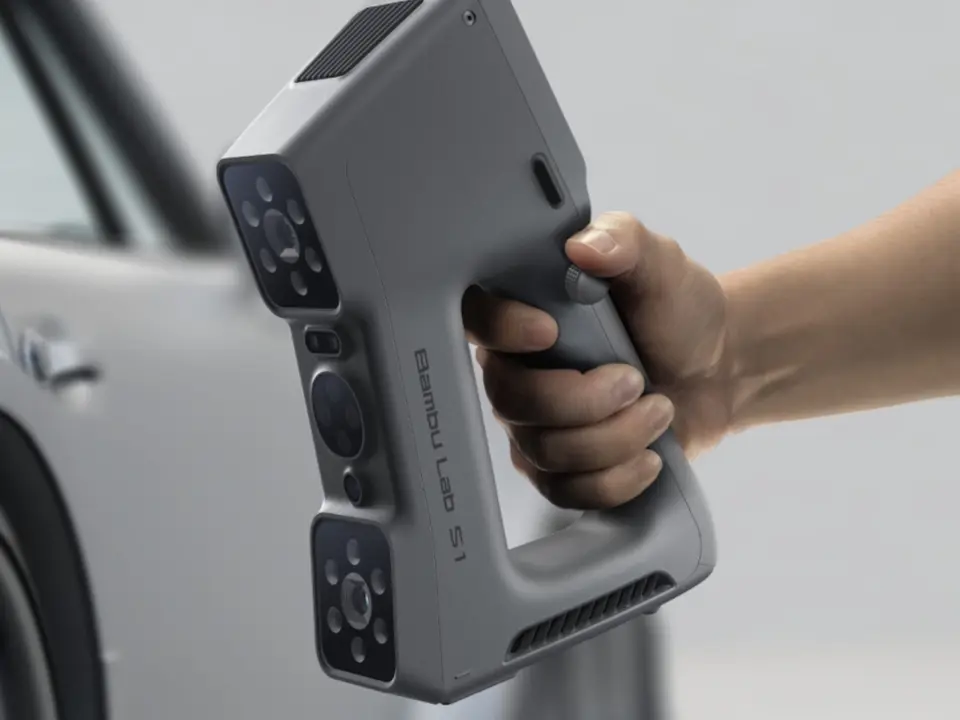
Bambu Lab launched S1 – wireless 3D scanner for beginners. The device is made for people who are new to digitizing objects, and doesn't require you to be constantly plugged in. The device can simply be moved around your work space without being tied down to a PC. This portable device makes it easier for hobbyists to digitize (scan) things, be it small items or furniture.
Wireless 3D scanner with 34 laser lines and infrared mode
This 3D scanner also features a 3.5-inch touchscreen for you to control it directly. The device can be powered by up to two 4800 mAh batteries. That means you get up to 3.5 hours of scanning before you need to recharge the batteries.
Specifications
- Scanning Modes: Single blue laser, seven blue lasers, 34 laser lines, infrared
- Measurement Error: Up to 0.02 mm (0.0008 inches)
- Max Scan Area: 732 x 612 mm (28.8 x 24.1 inches)
- Connectivity: Wi-Fi 6
- Price: $1,699
The device connects to the computer over Wi-Fi 6 to transfer data. This way, you can have the freedom to scan things freely, and the connected PC will be doing the geometric processing for you.
To make sure you can use the S1 for various tasks, Bambu Lab has it equipped with various scanning modes. These include using a single blue laser, 7 blue lasers, 34 individual laser lines, and infrared scanning. When using blue laser modules, you get an error margin of no more than 0.02 millimeters. When using infrared mode, the maximum scanning area can be 732 mm x 612 mm.
It's important to note that the S1 requires a PC running on Windows. No Linux or macOS support at the moment. To use the S1, your PC has to meet the minimum requirements.
Minimum requirements are 16 GB RAM, and Nvidia GeForce RTX 2060 with 6GB video memory. This is important to make sure the software will be able to efficiently process scan data. You do need a dedicated GPU to meet the baseline performance requirements.
Bambu Lab is selling S1 directly from their manufacturer. The price of S1 is $1699. $1699 puts S1 in the premium range for a device that's made for dedicated beginners. You'll want to make sure your PC meets the right GPU and RAM threshold before getting it.
There are no third-party software bundles with the device. You'll be using the manufacturer's native ecosystem.
Source: Bambu Lab S1, NotebookCheck
Discussion
0 comments