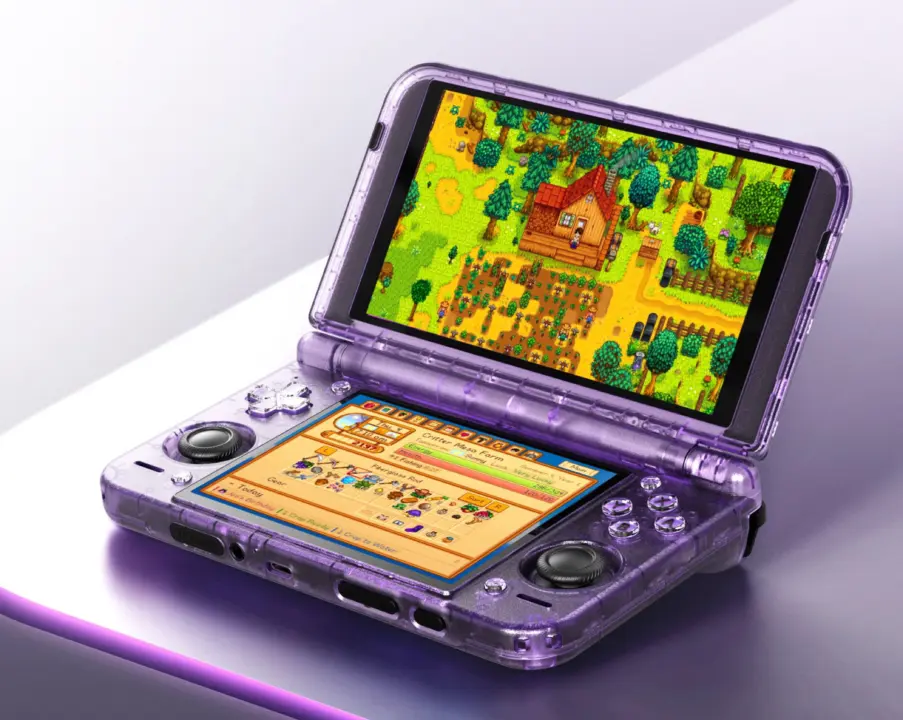
A new mod for Stardew Valley will alter the way players experience the game on certain handhelds. Specifically, this update provides dual-screen support to Android handhelds that use dual-screen setups. Why is this change important?
Stardual Valley mod moves inventory and UI to secondary display
It clears the main screen from visual clutter and provides a dedicated space for player menu and inventory. Players of supported handhelds will now be able to better segregate their gameplay and management activities.
Stardual Valley is a new mod that can be downloaded from NexusMods for the original ConcernedApe game. It's designed to work on dual-screen Android handhelds like the AYN Thor, Retroid Pocket Duo, and Anbernic RG DDS. The mod is based on the Stardew Valley desktop build which is used on Cinderbox emulator. This method provides support for the secondary touchscreen by identifying the second screen and allowing the game to make use of it.
A lot of user interface elements have been moved to the secondary screen to make the main view simpler. The mod places the inventory lists, energy level, and in-game clock onto the secondary screen. Players can use the secondary touchscreen to directly access the Stardew Valley menu.
In addition, the mod includes the wiki for residents and seeds. It also includes the option to use a cheat menu for convenience.
The mod uses a large amount of AI for code, art, and UI/UI. It's currently only been tested officially on the AYN Thor handheld. The mod may or may not be compatible with other dual-screen devices like Retroid Pocket Duo and Anbernic RG DDS.
This has not been confirmed by the mod creator. Players using non-supported devices may find that the mod is not stable or fully functional.
The mod opens up the technological potential of dual-screen Android handhelds through community modding. It offers a (albeit AI-aided) working solution to handling game data on dual-screens. If you have a supported handheld, the mod can be downloaded from NexusMods for you to try out the new UI layout.
Source: NotebookCheck

Discussion
0 comments