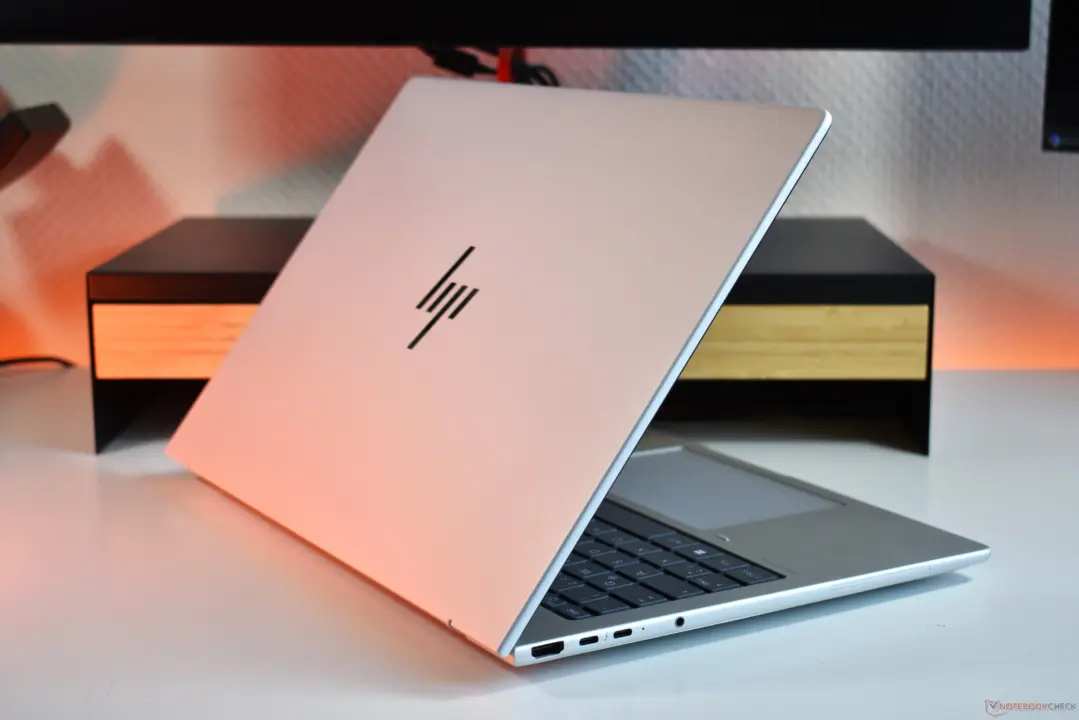
Business buyers choosing between the Lenovo ThinkPad T16 Gen 5 and the HP EliteBook 8 G2a 16 must weigh build material and upgradeability against raw processing power and display quality. These two 16-inch laptops target the same office demographic but offer fundamentally different approaches to longevity and daily performance. The decision hinges on whether you prioritize the ability to replace components yourself or prefer a device that delivers faster speeds and better color accuracy out of the box.
HP EliteBook 8 G2a 16 outperforms ThinkPad T16 Gen 5 in speed and battery, though the Lenovo model retains upgradeable RAM and an Ethernet port
Lenovo equips the ThinkPad T16 Gen 5 with a plastic base reinforced by a magnesium insert and an aluminum lid. This construction supports a 180-degree screen hinge and includes a dedicated RJ-45 Ethernet port for wired connectivity. The input area features a red TrackPoint with dedicated mouse clickers alongside a plastic mechanical clickpad, catering to users who prefer tactile feedback over glass surfaces.
Spec comparison
| Spec | ThinkPad T16 Gen 5 | HP EliteBook 8 G2a 16 |
|---|---|---|
| Chassis Material | Plastic base with magnesium insert, aluminum lid | Aluminum lid and base |
| Memory | Upgradeable SO-DIMM | Soldered |
| Screen Hinge | 180 degrees | 166 degrees |
| Input Device | Red TrackPoint with plastic mechanical clickpad | Glass clickpad |
| Wi-Fi Module | Soldered | Modular |
HP constructs the EliteBook 8 G2a 16 entirely from aluminum for both the lid and the base. This chassis houses a larger glass clickpad and offers a 166-degree screen opening angle. Memory configuration differs significantly between the two; the EliteBook uses soldered RAM, while the ThinkPad provides upgradeable SO-DIMM slots. Wi-Fi connectivity follows the opposite pattern, with the EliteBook featuring a modular module and the ThinkPad having a soldered card.
Performance testing reveals that the EliteBook holds a computational advantage because it ships with a newer Ryzen 7 processor. The ThinkPad we tested contained an older Ryzen 5 chip, which results in the EliteBook winning performance benchmarks comfortably. Display quality also favors HP, as the EliteBook screen delivers better color reproduction than the more mediocre ThinkPad display.
Battery life and thermal behavior show mixed results depending on the configuration. Both laptops offer two battery options, with the EliteBook providing 62 Wh or 77 Wh cells and the ThinkPad offering 60 Wh or 75 Wh. When tested with the larger battery options, the EliteBook delivered better battery life than the ThinkPad. Under heavy load, the EliteBook gets louder while the ThinkPad runs hotter.
The ThinkPad T16 Gen 5 appeals to users who need extensive port selection and the ability to upgrade memory. The HP EliteBook 8 G2a 16 suits those who want a premium aluminum build, superior screen colors, and faster processing speeds. Buyers should verify the specific CPU generation included in their unit, as the tested ThinkPad lagged behind the newer EliteBook hardware.
Source: NotebookCheck
Discussion
0 comments