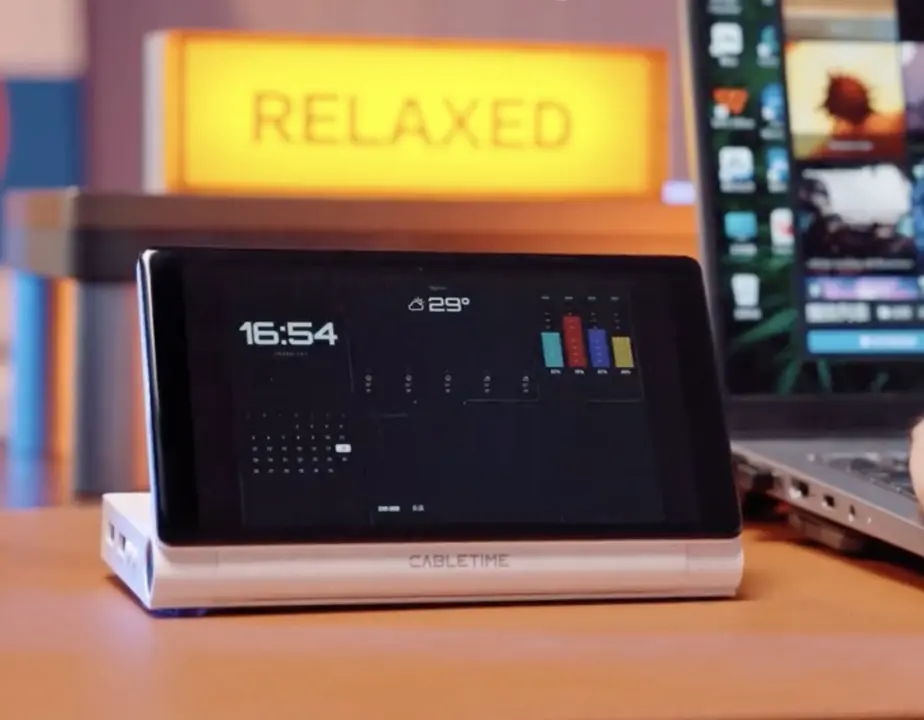
A new docking station adds a small screen directly to your desk setup. The CableTime ScreenDock brings a 5.5-inch display to an 8-in-1 hub. This design lets you run a second monitor without a separate panel. You can use the screen for game stats, system dashboards, or chat windows. It simplifies the desk by combining connectivity and display in one unit.
Kickstarter pricing and specs for the new integrated display dock
The device connects to your computer via a single USB-C cable. It carries 100W of power delivery to charge your laptop while running the dock. The built-in display runs at a resolution of 1280 by 720 pixels. CableTime designed the screen to act as a secondary monitor for your workflow.
Specifications
- Display: 5.5-inch, 1280×720
- Ports: USB-C 3.0, USB-A 3.0, USB-A 2.0
- Connectivity: SD/TF, Gigabit Ethernet, HDMI 4K60Hz
- Power: 100W PD via USB-C
- Compatibility: macOS 10.12+, Windows 10+, Linux
The hub includes a variety of ports for your peripherals. You get one USB-C 3.0 port and two USB-A ports (one 3.0 and one 2.0). It also features an SD and TF card reader for photos and files. A Gigabit Ethernet port provides wired internet access. An HDMI port supports 4K video output at 60Hz for a main monitor.
The ScreenDock works with macOS 10.12+, Windows 10+, and Linux. Early backers on Kickstarter can secure a unit for $119 USD (around $119). This price point targets users who want a compact, all-in-one docking solution. The product aims to reduce cable clutter while adding display functionality.
CableTime has shared an estimated delivery date of October 2026. Crowdfunding campaigns often face delays, so that date remains an estimate. We looked at similar docking stations earlier while tracking accessory launches. The ScreenDock offers a distinct approach by integrating a display directly into the hub.
Source: ScreenDock, NotebookCheck