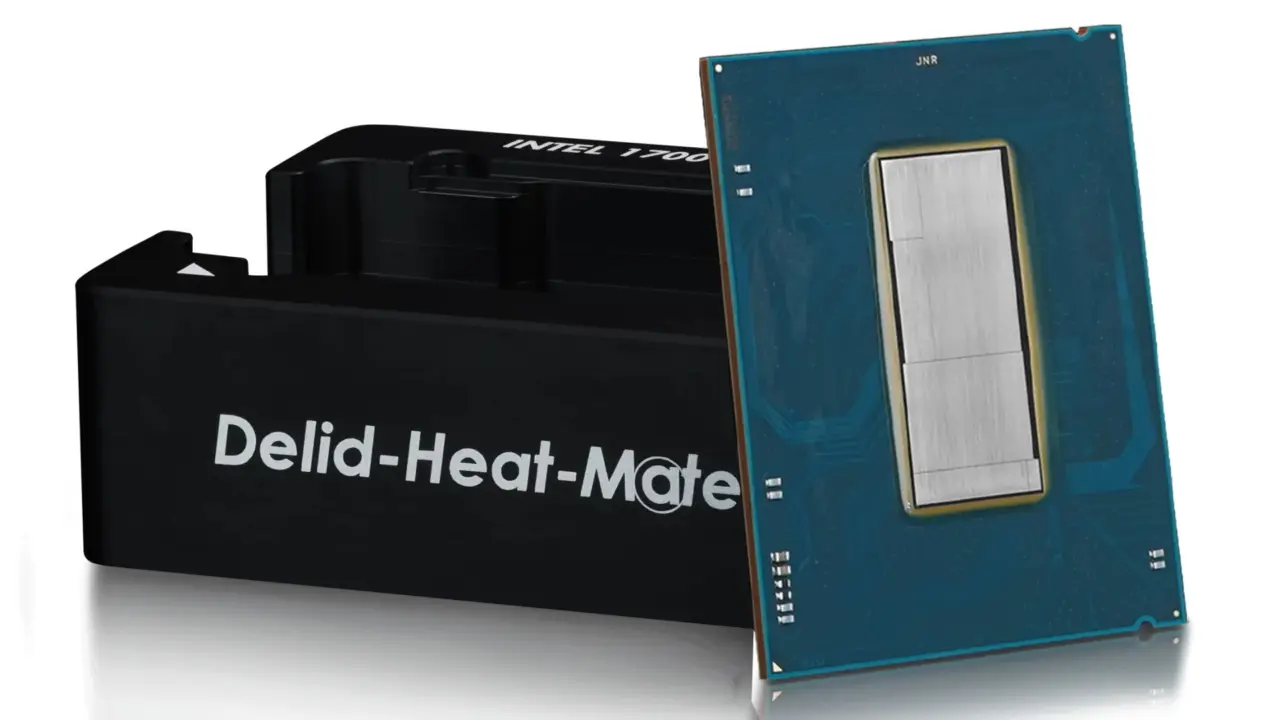
Thermal Grizzly has a new gadget for PC tinkerers who need to tweak their CPUs for better cooling. The Delid-Heat-Mate is a new aluminum fixture that works in a conventional kitchen oven to hold your CPU in place. The device makes it easy to safely go through the delicate process of delidding your chip by heating it up to help soften the indium solder of the heat spreader.
Aluminum fixture heats CPUs to 165°C in kitchen ovens to soften solder
For many, going through this process by hand carries a lot of risk of damaging your processor. Having a way to control the heat makes this a safer option for the more skilled builder.
Delid-Heat-Mate Specifications
- Supported Sockets: AMD AM5, Intel LGA 1700, LGA 1851, LGA 1954
- Material: Aluminum
- Recommended Oven Temperature: 165–175 °C (max 180 °C)
- Price: $23.28
The Delid-Heat-Mate can fit a wide array of modern CPU sockets. This tool supports AMD AM5 CPUs as well as the newer Intel LGA 1700 and LGA 1851 socket designs. It can also work for future LGA 1954 CPUs.
The aluminum material helps to evenly spread out the heat as your chip bakes. The broad support for the tool ensures it'll be useful as Intel moves to different socket designs in the near future.
When you use the Delid-Heat-Mate, you'll want to have your oven heated to between 165-175 °C to effectively soften the solder. Thermal Grizzly stresses that the temperature should never go above 180 °C, which could damage the silicon. The heat is utilized through thermal expansion of the aluminum fixture to aid in separation of the integrated heat spreader from the CPU die. Getting this specific temperature range is important to make sure you don't harm the integrity of your CPU when you're attempting to remove the heat spreader.
You can find the Delid-Heat-Mate on Thermal Grizzly's website for $23.28. This makes it quite affordable to those that like to tinker with their hardware as a hobby. There's usually a chance that you'll void your manufacturer warranties when you delid, not to mention you're running the risk of ruining your CPU if you mess up. You'll have to consider the potential cooler performance vs. the risk of destroying your CPU before you attempt it.
Source: Thermal Grizzly, NotebookCheck
Discussion
0 comments