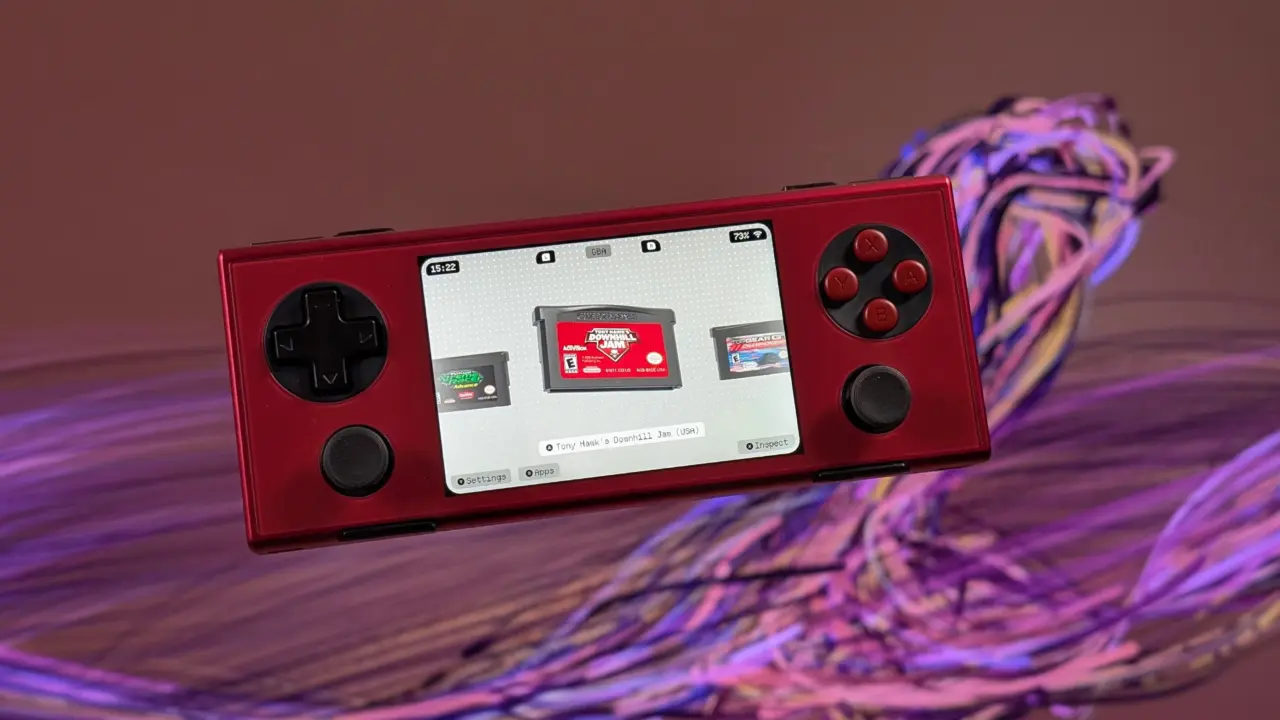
0.9.0 Socket Update – Functional update for Android Handheld Launchers. Emphasizes library management & compatibility more than bells and whistles. Helps alleviate common workflow pain points such as having direct access to your server for downloading games.
Socket v0.9.0 update brings RomM server integration and PS Vita support
Also adds support for more legacy handheld hardware. This feels like a step towards better access and maintainability for personal rom libraries, across a wider variety of form factors. The update is a big deal for those managing large library's, or have dual screen devices such as Ayn Thor.
- RomM Integration: Support for pairing with RomM servers via code or API token, browsing libraries, downloading games, and syncing saves
- Platform Support: Added Sony PS Vita platform support
- Dual-Screen Features: Options to choose which screen a game opens on, dim bottom display, and place keyboard on bottom screen
- Audio: Custom background music support (OGG, MP3, WAV)
- UI/UX Fixes: Fixed UI spillover on large scales and 3:2/4:3 screens (e.g., Konkr Pocket), RetroArch restart bug, controller navigation issues
Application: Android handheld console launcher. Provides a central console to view / launch emulated games. With this update, the matrix of supported platforms now includes Sony PS Vita titles so that you can launch Vita games directly from the interface. The key functionality of the app is still managing your local game files for a consistent user experience regardless of what hardware setup you're using.
Big change is integration with RomM. So you can have the launcher connect with your personal RomM server using a code (or API token). Now you can see your library on the server by platform & download games directly to your ROM folder.
You also sync saves between device & server. Other changes include adding custom background music support (ogg, mp3, wav) that will loop while browsing & then stop playing when launching a game. Also added granular control for dual screen devices in regards to behavior. (Example: launching games in the bottom screen. Adjust keyboard placement)
Fixing a lot of UI and stability problems from previous versions on certain hardware. Fix UI spilling on high scale or 3:2 / 4:3 screens like Konkr Pocket. Fix issue where if you leave retroarch for a few seconds it would reload instead of go back to launcher.
Fixed Controller issues in the menus. Fixed playtime bug in sleep mode. Updated settings menu to be organized by different tabs. (Example: appearance, display, carousel, games, audio, controls, dual screen.)
Last socket update covered when they added some initial dual screen support. This update builds on that idea. Current version includes the list of supported emulators.
So games will launch even if the download of the list of emulators fails. Now you can add multiple new games as seen after a scan. No need to click into the reveal screen for each game when adding multiple.
Now the random game selection will take ~1 second regardless of library size. A more stable and connected experience for existing users. Pricing / availability remains unchanged.
Source: RetroHandhelds
The RetroArch restart bug was a real pain point. I would launch a title, wander away, and come back to the launcher reloading the core instead of just sitting in the background. That fix alone makes the update worth the download.
Finally. RomM integration is the missing link for anyone with a local server. No more manual file transfers. The save sync logic looks solid too.