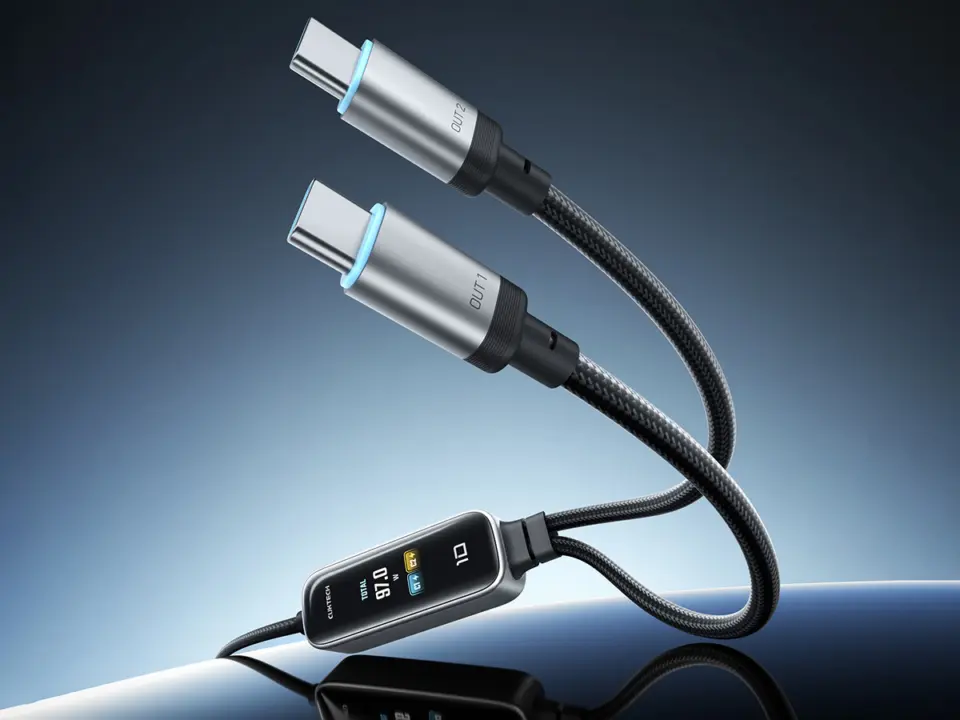
Cuktech has released a new smart charging cable that splits power across two devices while showing real-time stats on a built-in screen. This 2-in-1 design lets users charge a laptop and a phone simultaneously without needing separate bricks. Buyers who travel light or manage multiple devices at a desk will find the dual-output capability and visual feedback useful for monitoring charge levels. The cable prioritizes convenience by combining high-speed power delivery with a compact form factor.
Dual USB-C ports split 140W power while a small screen shows charging stats
The product, called the Cuktech 10 2-in-1 Smart Cable, uses USB-C connectors to deliver power to two endpoints. It features a 0.96-inch TFT screen embedded in the cable body to display charging status and battery percentage. The device supports the Xiaomi Home app, allowing users to monitor power usage and control settings remotely. This integration connects the hardware to Xiaomi's ecosystem for those who already use their smart home platform.
Specifications
- Total Power Output: 140W
- Split Power Output: 112W + 25W
- Display: 0.96-inch TFT
- Protocols: PD 3.1, PPS, AVS, UFCS, SCP
- Price: 129 CNY (around $19.20)
The cable delivers a total rated power output of 140W, which splits into 112W for one port and 25W for the other when both are in use. It supports multiple fast charging protocols, including PD 3.1, PPS, AVS, UFCS, and SCP. The inclusion of OPC 2.0 helps protect battery health during high-speed charging sessions. Data transfer is limited to 480Mbps via USB 2.0, which is standard for power-focused cables rather than high-speed data hubs.
Measuring 1.5 meters in length, the cable provides enough reach for typical desk or bedside setups. It is priced at 129 CNY (around $19.20) in China, where it is currently available for purchase. Cuktech expects to launch the cable globally soon, though specific international regions and dates remain unconfirmed. We looked at similar smart cables earlier while tracking accessory trends in the USB-C space.
Source: NotebookCheck


Discussion
0 comments